fletch
65 discussion posts
I'm monitoring a text log file and would like to be able to add a column for each entry that represents the date/time. Is that possible?
It should be possible, yep! Could you attach a sample of the log format so that I can check it out and provide some recommendations?
fletch
65 discussion posts
i see that columns can be edited/added, but can't find any docs on syntax.
# Event
357404 2026-09-10T14:01:16.796Z << [FTP Session 1090 192.168.1.234 MRI] 150 Starting data transfer.
357405 2026-09-10T14:01:16.848Z << [FTP Session 1090 192.168.1.234 MRI] 226 Operation successful
357406 2026-09-10T14:01:17.111Z >> [FTP Session 1090 192.168.1.234 MRI] TYPE I
357407 2026-09-10T14:01:17.111Z << [FTP Session 1090 192.168.1.234 MRI] 200 Type set to I
357408 2026-09-10T14:01:17.113Z >> [FTP Session 1090 192.168.1.234 MRI] MODE S
357409 2026-09-10T14:01:17.113Z << [FTP Session 1090 192.168.1.234 MRI] 200 MODE set to S
357410 2026-09-10T14:01:17.114Z >> [FTP Session 1090 192.168.1.234 MRI] STRU F
357411 2026-09-10T14:01:17.114Z << [FTP Session 1090 192.168.1.234 MRI] 200 Using file structure 'File'
This log is a bit tricky because some of the text has spaces, so you can't just delimit the later columns by spaces. Something like the attachment works though. You can get to the column edit window by right-clicking the log's tab and choosing Edit Columns.
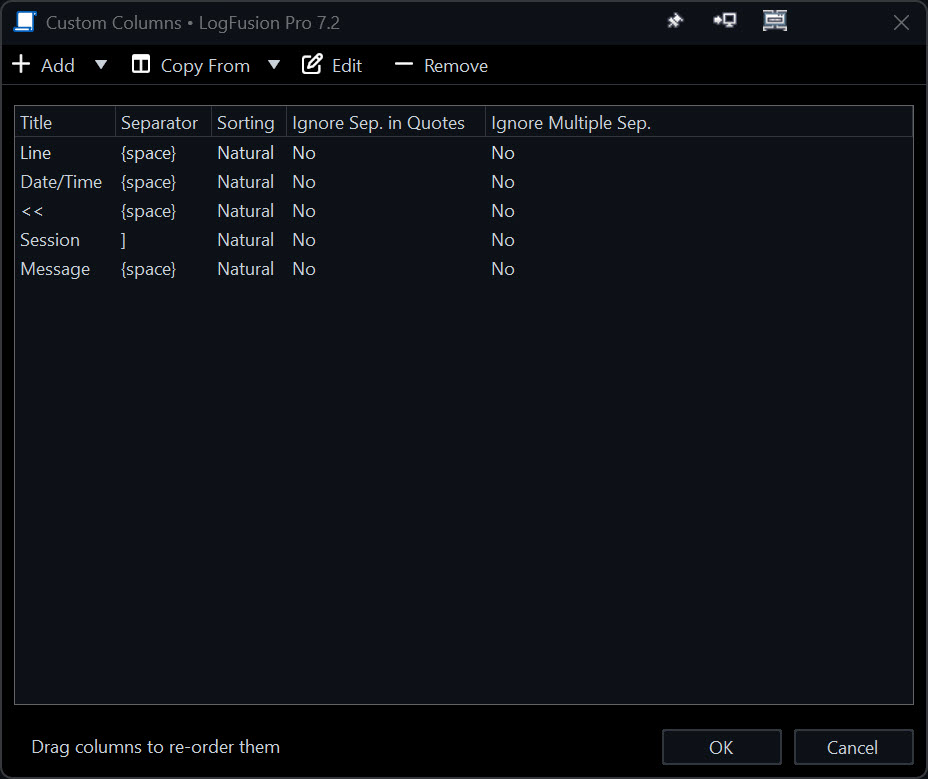
columns.jpg
fletch
65 discussion posts
I"m confused. Is what you provided just supposed to split the output into separate columns? I was looking to add data to the output - specifically the date/time the entry was displayed in logfusion. Pretty sure now that's not possible.
Since I can't find any documentation for Logfusion, what's the purpose of adding new columns? Just being able to sort and resize them?
Also, where can I find the syntax for Seperator?
In addition, notice the file includes << AND >> - so that complicates things.
Sep 11, 2026 (modified Sep 11, 2026)
•
#5
fletch
65 discussion posts
Ok, that's interesting. My issue is that the log file is in UTC and I don't want to have to keep doing math or add a UTC clock to my task bar.
I think I get it now, but two questions about your example.
The - as the separator for Date/Time. How does the actual - in the Date/Time string not affect that in your example?
{space} - what other special syntax like that is supported? How would one naturally know to use {space} since it's not documented anywhere? /T for tab is the only one mentioned on the dialog.
You're right, for the date one it should actually be `-{space}` so that it doesn't trigger on the dashes in the date.
Regarding the special characters, `\T` is the only one. `{space}` just shows up like that when you put an actual space character in there so that it's represented in the list, instead of just looking like a blank entry.